The plugin will not activate
Gillish Cairnstone needs WordPress 7.0 or newer and PHP 8.3 or newer. If PHP is too old, the Plugins screen shows a notice with your version. Check both versions under Tools → Site Health → Info, or ask your host. If both are fine and it still fails, your host’s PHP error log shows why.
A block does not appear in the inserter
- A library block, such as Hero or FAQ: go to Cairnstone → Settings → General and check that the block A piece of a page, such as a paragraph, a picture or a button. In WordPress you build a page by putting blocks one after another. is switched on. Each block has its own switch.
- A block you built yourself: check that it is Published. Drafts do not show up in the inserter.
A country rule never matches
Go to Cairnstone → Settings → Integrations and read the country status line.
If detection is off, turn on Detect visitor country.
If it says it is waiting for Gillish Node, install and activate Node.
If it says country detection is turned off in Gillish Node, follow its link and turn on Node’s country detection.
If it says Node has no country source yet, follow its link to Gillish Node’s settings and choose one of the country sources it offers. See Choose a country source.
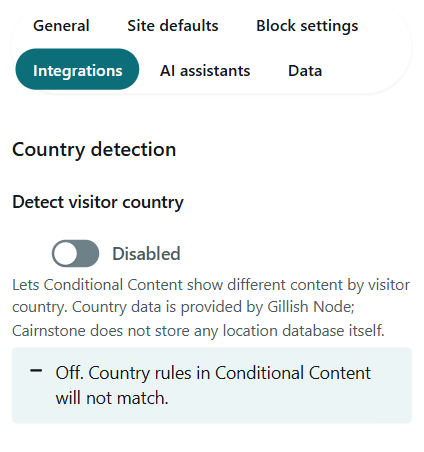
Cairnstone gets the visitor’s country from Gillish Node, so country rules match once Node has a country source set up. The note under a country rule in the editor says the same, unless you turned it off.
The admin goes blank after activation
This is rare. It means the site hit a fatal error. To get back in:
With your host’s file manager or SSH, rename the folder
wp-content/plugins/gillish-cairnstoneto anything else.Reload the admin. WordPress turns the plugin off and the admin comes back.
Report the problem with your PHP version, your WordPress version and the lines from
wp-content/debug.log.
Still stuck?
Use the contact page on the Gillish website. You find the link in the site footer.