Node can tell which country a visit comes from. Redirect rules and Link Analytics use it, and so do Gillish Cairnstone’s country rules when Cairnstone is installed.
Set up country detection
Open Node → Settings, tab General, and check that Country detection is switched on under the modules.
Open the tab Integrations and find Country detection.
Pick a Country source. The five choices are below.
Do what that source needs first.
Click Save changes.
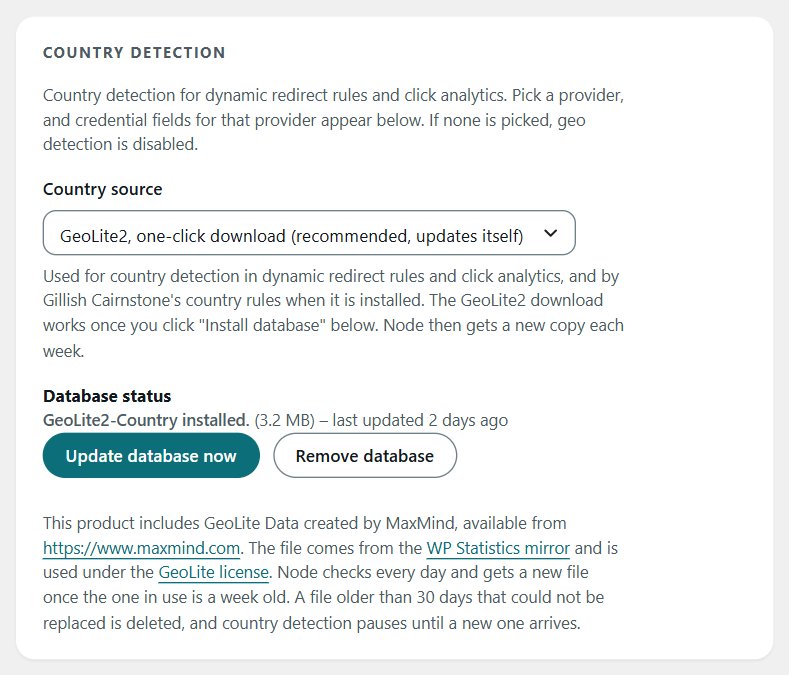
Node uses one source at a time and gives each visit its country. The settings show whether the source you picked is ready, and what to do next if it is not.
The five sources
- GeoLite2, one-click download (recommended, updates itself). First: click Install database. Node downloads MaxMind’s free GeoLite2 country file (about 2 MB to download, about 3 MB on your server) from a mirror run by WP Statistics and keeps it in a folder in your uploads folder whose name is made for your site alone, so nobody can download it by guessing its address. You get the country of each visit, looked up on your own server. Node checks for a new file every day and gets one once the file in use is a week old. If no new file could be fetched for 30 days, Node deletes the old one, as MaxMind’s licence asks, and fetches a new one at its next daily check that works. Once the file is installed, the section shows its size and when it was last updated, and two buttons. Update database now fetches a new file at once, whatever the age of the one in use. Remove database asks “Remove the local country database file? Country detection will be disabled until you re-install it.” When you confirm, it deletes the file, and the section shows only Install database: country detection stops (a redirect rule on country matches nobody, Gillish Cairnstone gets no country, and clicks keep no country) until you click Install database again, because Node does not fetch a file you removed by itself. This product includes GeoLite Data created by MaxMind, available from https://www.maxmind.com.
- Cloudflare (CF-IPCountry header, for sites behind Cloudflare). First: your site must run behind Cloudflare, which adds a
CF-IPCountryheader to each request. Node reads each visit’s country from that header, so there is nothing to download. Visits that Cloudflare marks as unknown or as Tor are counted without a country. Pick this when every visit reaches your site through Cloudflare. - MaxMind GeoLite2: bring your own database file (advanced). First: get a GeoLite2 country .mmdb file from MaxMind yourself, put it on your server, and type its full path in GeoLite2 database path. Node reads the country from that file on your server. When MaxMind releases a new file, put it in place of the old one. The settings tell you if the path is empty or points to no file.
- IP2Location LITE: bring your own database file (advanced). First: install the IP2Location PHP library on your site, so that it loads through
wp-content/vendor/autoload.php. With Composer on your server, go to your site’s wp-content folder and runcomposer require ip2location/ip2location-php, which makes that file; the library needs the PHP extensions bcmath, curl and json. When another plugin An add-on you install in WordPress to give your site new features. Gillish Cairnstone and Gillish Core are plugins. on your site has already loaded the library, Node uses that one. Then get an IP2Location LITE .BIN file, put it on your server, and type its full path in IP2Location database path. Until the library is in place, the settings remind you to install it. - (None, geo detection disabled). Country lookups stay off, and rules that use Country wait until you pick a source. The settings remind you to pick one.
Next, read Map your internal links with the Content Graph.