Node can send a message to an address you choose when something needs you: a Zapier Catch Hook, a Make webhook A message your site sends by itself to another service when something happens, for example when someone sends a form., an n8n Webhook node, or any address that accepts JSON. Every message says what kind of event it is, so one flow can sort them:
managed_link_status_change: a managed link’s target became broken, or works again. It carries the link’s clicks and the Search Console clicks of the posts that link to it.content_broken_link: the Content Graph found a new link inside a post that leads nowhere on your site.rank_mover_detected: a search query moved past the Rank Tracker alert threshold. See Track your rankings with Rank Tracker.
Set up webhooks
Open Node → Settings, tab General, and switch on Webhooks under the modules.
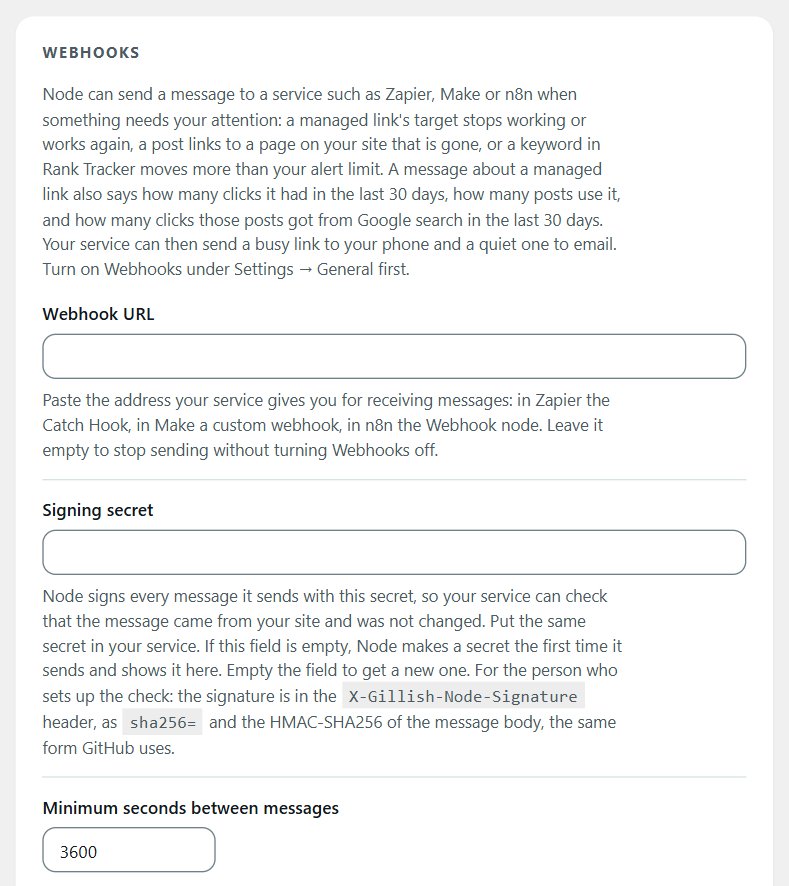
Open the tab Link Management and find Webhooks, near the bottom.
Paste your address into Webhook URL. Left empty, nothing is sent.
If you want, change Minimum seconds between messages: 3600 (one hour) unless you change it, from 60 to 86400; a value outside that is ignored when you save.
Copy the Signing secret into your receiver. If it is empty, Node makes one the first time it sends and shows it there.
Click Save changes. Messages start with the next change; for broken links in posts, the first map build after saving reports every broken internal link there is now.
When each event is sent
A link’s event comes from the link health check, which runs with the Auto-Link module: daily for the 25 links checked longest ago, or for all links with Run health check now on the Auto-Link page. Every published or draft managed link is checked. An event is sent when a link becomes broken, and when it works again, so your flow can say “the link is back”. A link counts as broken when its target is gone (404, 410, or a domain that no longer exists) two checks in a row; a site that refuses a check sends nothing.
A broken-link event comes when the Content Graph map is built: when someone opens the Content Graph, SEO Stats or the Gillish Dashboard without a stored map, or reloads the map. Each newly broken internal link sends one event, and a reported link stays quiet until it works again and breaks again. Nothing builds the map on a timer, and the map is kept for a day, so for a daily check click Reload Map Data on the Content Graph once a day. Only links to your own site are checked.
How messages are grouped
Node sends at most one message per Minimum seconds between messages. The first event after a quiet spell goes out at once; events within the interval wait and go out together with the next event after it, so your phone does not ring 200 times when a whole site goes down. With 500 events waiting, Node sends them at once. If your receiver does not answer with a 2xx status, the events stay queued and go out with the next message, when another event comes; turn on WP_DEBUG_LOG in wp-config.php to see the failures.
Test your address
Make a free address at webhook.site and copy it.
Paste it into Webhook URL and save.
Make a managed link that points at
https://example.com/does-not-exist-404. Check that the Auto-Link module is on.On the Auto-Link page, click Run health check now, wait until it is done, then click it once more. The first check marks the link “checking again”; the second makes it broken, which sends the event.
webhook.site shows the message within a few seconds, unless Node sent something within the last Minimum seconds between messages.
Stop the messages
Switch off the Webhooks module under Settings → General: waiting events are kept and go out with the next new event after you switch it on again. Or empty the Webhook URL: nothing is queued or sent, and the module stays on.
For developers: check and read a message
Node signs every message. The X-Gillish-Node-Signature header holds sha256= and the HMAC-SHA256 of the message body, made with your signing secret, the same form GitHub uses. Make the same HMAC from the raw body and your secret, and accept the message only when it matches. The body’s timestamp lets you turn away an old message sent again. To change the secret, empty the field and save: Node makes a new one on the next send.
Each message holds an envelope and a links array; events from the same interval share the array, and each entry’s type says what it is:
{
  "event": "gillish_node_events",
  "timestamp": 1776200071,
  "site_url": "https://your-site.com",
  "links": [
    {
      "type": "managed_link_status_change",
      "link_id": 5355,
      "slug": "amazon",
      "title": "Amazon",
      "destination_url": "https://www.amazon.com/",
      "classification_old": "healthy",
      "classification_new": "broken",
      "http_status_old": 200,
      "http_status_new": 404,
      "node_clicks_30d": 145,
      "source_post_count": 7,
      "source_post_gsc_clicks_30d": 420,
      "manage_url": "https://your-site.com/wp-admin/admin.php?page=gillish-links&action=edit&link_id=5355"
    },
    {
      "type": "content_broken_link",
      "source_post_id": 314,
      "source_post_title": "Best compact cameras",
      "source_post_url": "https://your-site.com/best-compact-cameras/",
      "target_url": "/old-camera-roundup",
      "detected_at": 1776200068,
      "manage_url": "https://your-site.com/wp-admin/post.php?post=314&action=edit"
    }
  ]
}event: always gillish_node_events.timestamp: when the message was sent.site_url: your site’s address.- For a link:
link_id,slug,title,destination_url,classification_oldandclassification_new(healthy, pending, broken, unverifiable or unchecked),http_status_oldandhttp_status_new(the HTTP status, which can also be 597, 598, 599 or 0),node_clicks_30d,source_post_count(the posts with an auto-link to it),source_post_gsc_clicks_30d(their Search Console clicks; null when Node has no such data) andmanage_url. - For a broken link in a post:
source_post_id,source_post_title,source_post_url,target_url(as written in the post, without its query, its #part and a trailing slash),detected_atandmanage_url. - For a rank mover:
url_hash,query,position_now,position_then,delta,direction(improved, dropped or steady),post_id,permalink,snapshot_dateanddashboard_url.
Your own code can listen to these actions. gillish_node_content_broken_link runs only while the Webhooks module is on and a Webhook URL A web address, such as https://example.com/contact/. It is what you type in the browser to open a page. is set; the Webhooks module listens at priority 10. A third, gillish_node_rank_mover_detected, runs on every alert sweep.
// A managed link's verdict changed.
add_action(
	'gillish_node_link_health_status_changed',
	function ( $link_id, $old_class, $new_class, $old_code, $new_code ) {
		// Your own logging or alert.
	},
	10,
	5
);

// The Content Graph found a new broken internal link.
add_action(
	'gillish_node_content_broken_link',
	function ( $source_post_id, $target_url ) {
		// Your own logging or fix.
	},
	10,
	2
);
Next, read Find your way in Node’s settings.