You can connect an AI assistant, such as Claude or ChatGPT, to your site and ask it to build, change and publish blocks A piece of a page, such as a paragraph, a picture or a button. In WordPress you build a page by putting blocks one after another. for you. It works through your own AI client. Nothing it could change is open until you turn it on.
Turn on AI assistants
Go to Cairnstone → Settings → AI assistants.
Switch on Let AI assistants draft Cairnstone blocks.
Leave Let AI assistants publish on, or switch it off to check every change first.
Install and activate an MCP adapter plugin on your site, such as WordPress’s own MCP Adapter. It gives the address your AI client connects to; look it up in the adapter’s documentation.
Choose the WordPress user the assistant will act as. To read blocks, the user must be able to make saved blocks; to draft, change or publish blocks, it must be an Administrator.
Under Users → Profile for that user, create an Application password. The assistant signs in with it as that user, and you can revoke it there at any time.
In your AI client, add the adapter’s address as an MCP server, with the user name and the application password.
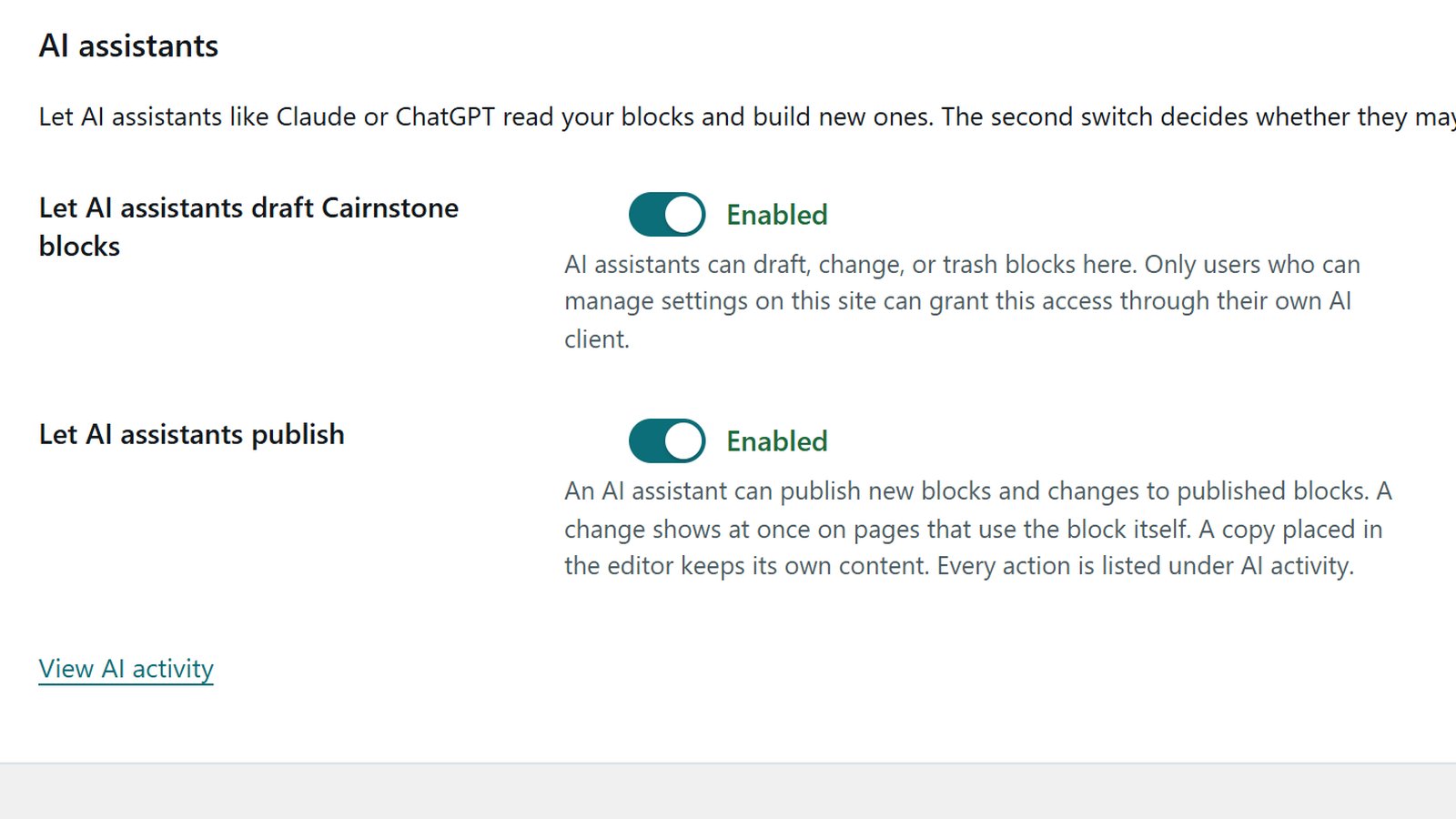
- Let AI assistants draft Cairnstone blocks, off to start with. Off, assistants can read your blocks and change nothing. Anyone who can make saved blocks on your site and connects a client can read them: each assistant reads every published block and its user’s own drafts, and for an Editor or an Administrator all blocks. On, they can also draft new blocks, change blocks and move blocks to the trash. Only people who can manage your site’s settings can turn it on.
- Let AI assistants publish, on to start with, and in effect only while the first switch is on. It lets an assistant publish new blocks and changes to published blocks, and trash a published block that pages use. Off, assistants save drafts for you to publish, and leave published blocks as they are.
Then you can say something like “draft an FAQ block about shipping”, and a new draft appears in your Cairnstone blocks list with an AI draft tag, ready for you to open, check and publish. The tag goes when you publish.
What a published change does
A change to a published block shows at once on pages that use the block itself, such as a page an assistant built. A copy placed in the editor keeps its own text and look; only Migrate existing instances changes it (see Change a block that is already in use). A page that places a block that is not published shows nothing there until the block is, so publish the block first and the page second.
Before it publishes, an assistant can try a change without saving: Cairnstone checks that the block shows and lists every page that uses it. Each published change keeps the earlier version, so you or the assistant can put it back. The cache Saved copies, such as copies of your pages, that make the site load faster. After a change, you may have to clear them before visitors see the new version. of every page that uses the block is refreshed (WordPress’s own cache, and LiteSpeed Cache when it is installed). A block that fails shows nothing instead of breaking the page, and the error goes to the site’s error log.
The AI activity log
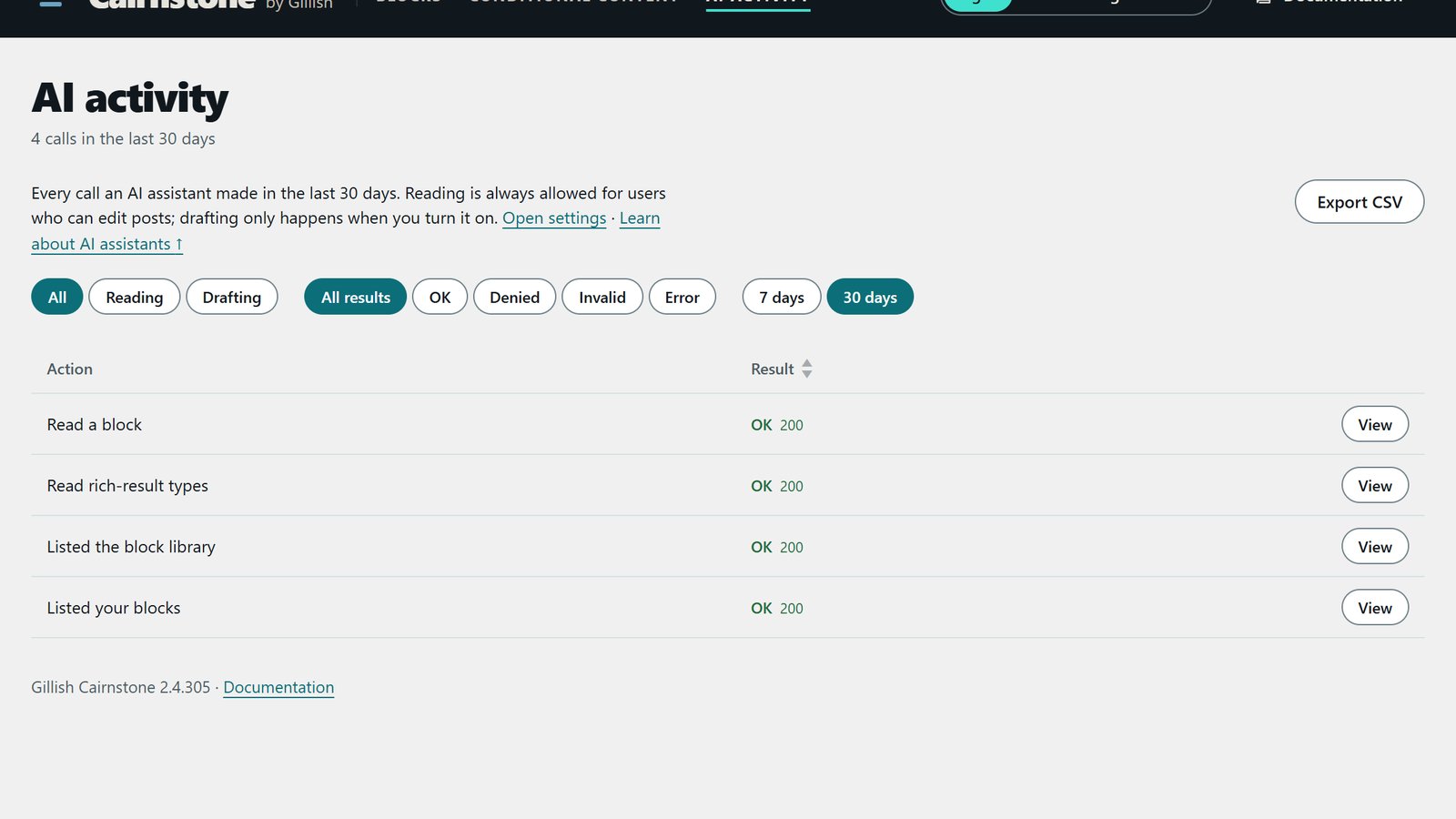
Cairnstone → AI activity lists every call an assistant made in the last 30 days: the time, the account, what it did and the result. IP addresses and browser details are not recorded. Filter by Reading or Drafting, by result (OK, Denied, Invalid, Error), and by 7 days or 30 days. View on a row shows exactly what the assistant sent and what it got back, and Export CSV downloads the list.
Next, read Prepare your privacy policy for Cairnstone.