Node can check the links in your published posts and pages, and help you fix those that lead nowhere. Link Health checks the target of each managed link. Broken Links checks the links you typed into your content.
Switch it on
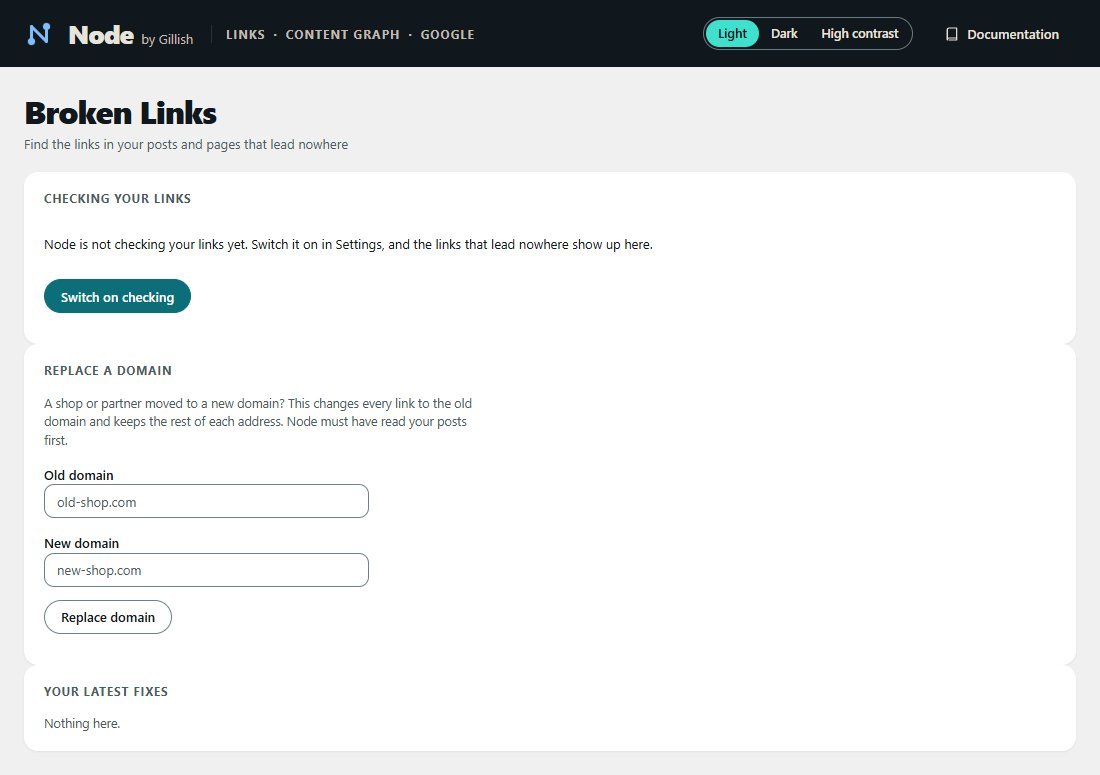
Go to Node → Settings and open the Broken Links tab. In the section Checking your links, switch on Check the links in my published posts and pages and click Save changes. While checking is off, the card Checking your links at the top of the Broken Links page has a Switch on checking button that takes you there. While checking is on, the same card says whether Node is still reading your content, is done, or is waiting because your server is busy. It also counts the addresses that work (Working) and those not checked yet (Not checked yet). Checking is off to start with, because your server then contacts the sites you link to. It sends no visitor data. It is a choice of its own: switching on Broken Links under General does not start it.
Every five minutes Node reads posts for up to three seconds, then checks up to 60 addresses, and no more than 3 on one outside site. Each round stops after ten seconds. On a test site with 5,000 posts and 4,800 different addresses, most of them on the site itself, every post was read after about an hour, and every address was checked after about seven hours. Links to many different outside sites take longer, since Node asks each site only 3 times a round. On a site with few visitors it all takes longer, as WordPress runs timed jobs when someone visits. When your server is busy, Node waits and goes on by itself.
Node reads your content again every day, and checks each address again after 7 days. Read everything again now starts from the first post.
What the list shows
- Broken: the page was gone at two checks, at least 20 hours apart. Gone means the answer was 404 or 410, or the domain no longer exists.
- Worth a look: the page answers, but may be dead. See below. Open the page and judge for yourself.
- Checking again: the page was gone once. Node asks again after 20 hours, so a short fault does not count.
- Could not check: the site refused or did not answer, as with 403, 429 or 503. The page may be fine. A link to an address inside a private network also lands here, as Node never asks those.
- Marked as fine: links you marked with This is fine. Node does not check them. Check it again takes one back.
An address that a redirect sends to a working page counts as working. The hosts you listed under Link Health as never to check count as working too.
Each row shows the address, the answer, when it was last checked, and the first three posts that use it, with the words of the link. The most used addresses come first.
Pages that answer but may be dead
Some sites answer “all is well” for a page that is gone. So Node reads the start of each working page on another site, and lists it under Worth a look when it sees one of these signs:
- The title says the page is gone, such as “Page not found” or “Domain for sale”.
- The link ends at an address for something closed or sold out, such as
/out-of-stock. - The link names a page deep in a site, but ends at its front page.
- A value that counts visits or pays you was lost on the way, such as
utm_source,tagorref. The link works, but your sale may not be counted.
A sign is a reason to look, not proof: a post about 404 pages has “404” in its title. If the page is fine, click This is fine.
Links to a part of a page
A link can point at a part of a page, such as /guide#step-2, or just #step-2 inside a post. Node looks for that part on your own pages, and lists a link under Worth a look when the part is missing. This often happens when a heading was renamed.
The row names the missing part. Open the post and fix it there: Replace and Remove link are not shown on these rows. Links to #top are left out, and so are parts of other sites’ pages.
Fix a link
- Use nearest page: a broken link to a page of your own site shows the closest published page after Nearest page:. Click the title to look at it first. Click Use nearest page, and every post that uses the old address links to that page instead. It is a Replace, so it shows under Your latest fixes and you can undo it. Links to other sites get no offer, and when no page is close enough, nothing is offered. Node picks the page the same way as for missing pages: see Redirect old addresses on your site.
- Replace: type the new address and click Replace. Every post that uses the old address gets the new one.
- Remove link: the link goes and its words stay. A link on a button stays, and so does a link in a block A piece of a page, such as a paragraph, a picture or a button. In WordPress you build a page by putting blocks one after another. that keeps its own copy of the address, such as a File block, as removing it would break the block. Node tells you how many stayed. Open the post to change those.
- Replace a domain: type the old and the new domain. Every link to the old domain moves, and the rest of each address stays.
www.example.comandexample.comcount as two domains. Node must have read your posts first.
One click changes up to 100 posts. If more use the address, click again. A fix saves the post, so its last-changed date moves, and WordPress keeps a revision if revisions are on.
Use an old copy
The Internet Archive keeps old copies of many pages. On the Broken Links tab under Node → Settings, switch on Offer old copies from the Internet Archive and click Save changes. It is off to start with, as it sends addresses to an outside service.
A broken link then gets a Find an old copy button. Your click sends that one address to archive.org, and nothing else goes there. If a copy exists, See the old copy opens it, and Use this copy makes every link to the dead page go to the copy. You can undo that like any other fix. While this is on, the Policy Guide has a paragraph about it for your privacy policy.
Undo a fix
Your latest fixes lists the last ten. Undo gives each post back as it was, for 30 days, also if revisions are off. Undo leaves a post alone if it has changed since the fix, so it never takes away later work. That includes a later fix: undo the newest first.
What Node does not read
Node reads links saved in the content of published posts, pages and other public post types. It does not read menus, widgets, comments, drafts or pictures. A link a block prints when the page is shown, such as Latest Posts, is not in the saved content.
Node leaves out managed links, mail and phone links, links inside the page, and addresses with no leading slash, such as page.html.